Know what your agents consume.
Tokenhawk is a local, live token-usage monitor for Claude Code, Codex, Gemini CLI, Antigravity CLI (agy), Pi, and OpenCode. It turns the metadata already stored on your machine into an interactive terminal dashboard, time-windowed spend analysis, on-demand transcript review, compact status output, and exportable records.
Quick start
Install the latest compiled release on macOS or Linux:
$ /bin/sh -c "$(curl -fsSL https://tokenhawk.dev/install.sh)"
$ tokenhawkThe installer detects your operating system and architecture, verifies the release checksum, and installs to ~/.local/bin. If needed, add that directory to your PATH.
Choose a version or install directory
$ TOKENHAWK_VERSION=0.6.0 sh -c "$(curl -fsSL https://tokenhawk.dev/install.sh)"
$ TOKENHAWK_INSTALL_DIR="$HOME/bin" sh -c "$(curl -fsSL https://tokenhawk.dev/install.sh)"
Install with Go
If you already have Go 1.26 or newer, you can install Tokenhawk directly from the module root:
$ go install github.com/polera/tokenhawk@latestIf the command is not found afterward, add $(go env GOPATH)/bin to your PATH.
Build from source
Building from source requires Go 1.26 or newer.
$ git clone https://github.com/polera/tokenhawk.git
$ cd tokenhawk
$ go build -o tokenhawk .
$ ./tokenhawk
Run Tokenhawk in a dedicated terminal tab or window. Missing provider directories are allowed, so there is no setup required for tools you do not use.
Keep Tokenhawk current
When the interactive dashboard starts in a terminal, Tokenhawk checks GitHub Releases at most once every 24 hours. If a newer release is available, you can install it immediately or defer the prompt for 24 hours. Run the upgrade directly at any time:
$ tokenhawk upgradeThe upgrade downloads the archive for your operating system and architecture, verifies its SHA-256 checksum against the release manifest, and replaces the current executable. After accepting an upgrade from the startup prompt, restart Tokenhawk to continue.
Privacy model
Tokenhawk session monitoring operates entirely on your machine. It reads provider session metadata from normal local stores and writes a rebuildable SQLite index beneath your operating system user-cache directory.
- Session and model identifiers
- Token category counts
- Session timestamps and status
- Project metadata and reported cost
- Prompts or responses
- Tool arguments
- Stored provider credentials
- Transcript content
Provider transcript files remain untouched. Search and session detail read current and previous user/assistant text directly from supported provider stores on demand, excluding tool traffic and reasoning, and never persist it to Tokenhawk index. A detail export includes the conversation you explicitly loaded; bulk and headless exports remain metadata-only. OpenCode SQLite database is opened read-only, including its live WAL data. AGY account and quota fields are ignored. Source paths are omitted from exports unless you explicitly pass --include-source.
ANTHROPIC_ADMIN_KEY is set. The key is read from the environment and is never written to Tokenhawk configuration or index.Dashboard
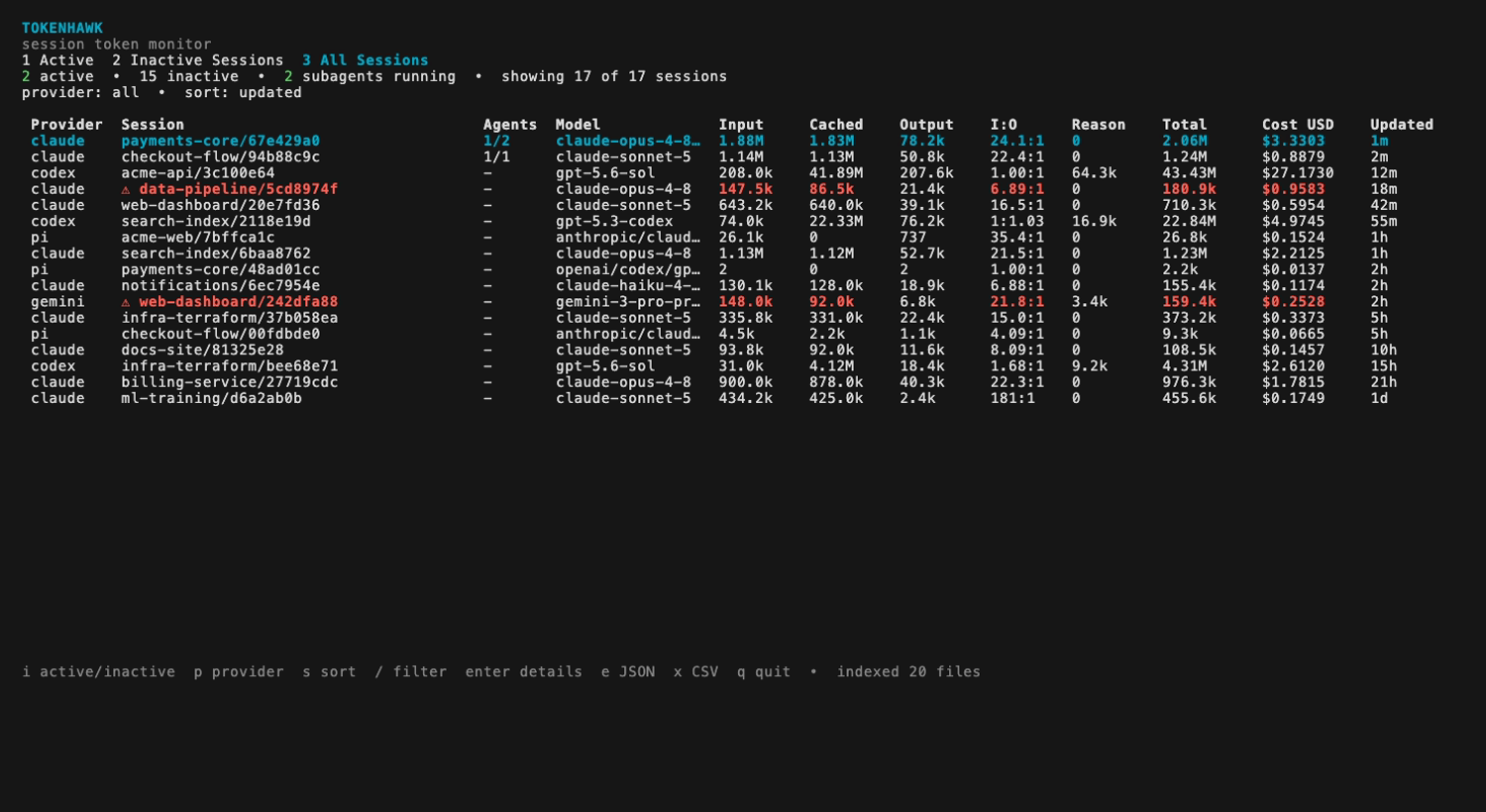
The dashboard has four persistent views: live sessions, complete session history, spend analysis across a time window, and transcript search. Session rows adapt to terminal width: compact layouts retain core totals and ratios, while wide layouts add model, token-category, reasoning, cost, agent, and update details.
Keyboard controls
| Key | Action |
|---|---|
| 1 | Open live sessions |
| 2 | Open complete session history |
| 3 | Open spend analysis |
| 4 | Search current and previous transcript contents |
| i | Toggle active and inactive lists |
| j k / arrows / page keys | Navigate sessions or scroll a spend report |
| p | Cycle provider filter |
| s | Sort by update time, tokens, or cost |
| / | Filter by project or model metadata, or edit a transcript query |
| Ctrl+R | Toggle literal and regular-expression transcript search |
| t | Cycle the time window in a spend view |
| d | Type a time window in a spend view |
| Enter | Open session detail and resume command |
| e / x | Export a session list, selected detail, or Spend as JSON / CSV |
| Tab / Shift+Tab | Move forward or backward through views |
| ? | Open the complete keyboard reference |
| q | Quit |
Low-cache warning
A session is highlighted when it has at least 100,000 input tokens and less than an 80% cached-input ratio. Detail view identifies low-cache parent and subagent workloads independently.
Spend reporting
Press 3 to aggregate tokens and cost over a time window. The view shows totals and input-to-output ratios, graphs token usage and cost over UTC time, then breaks the same sessions down by provider, model, and the 14 most recent UTC days. API-priced model rows show the uncached input, cached input, cache-write, and output quantities alongside the effective catalog rates used to calculate their cost. If the window contains older days, the view reports how many are omitted. Provider and search filters narrow both the view and its exports.
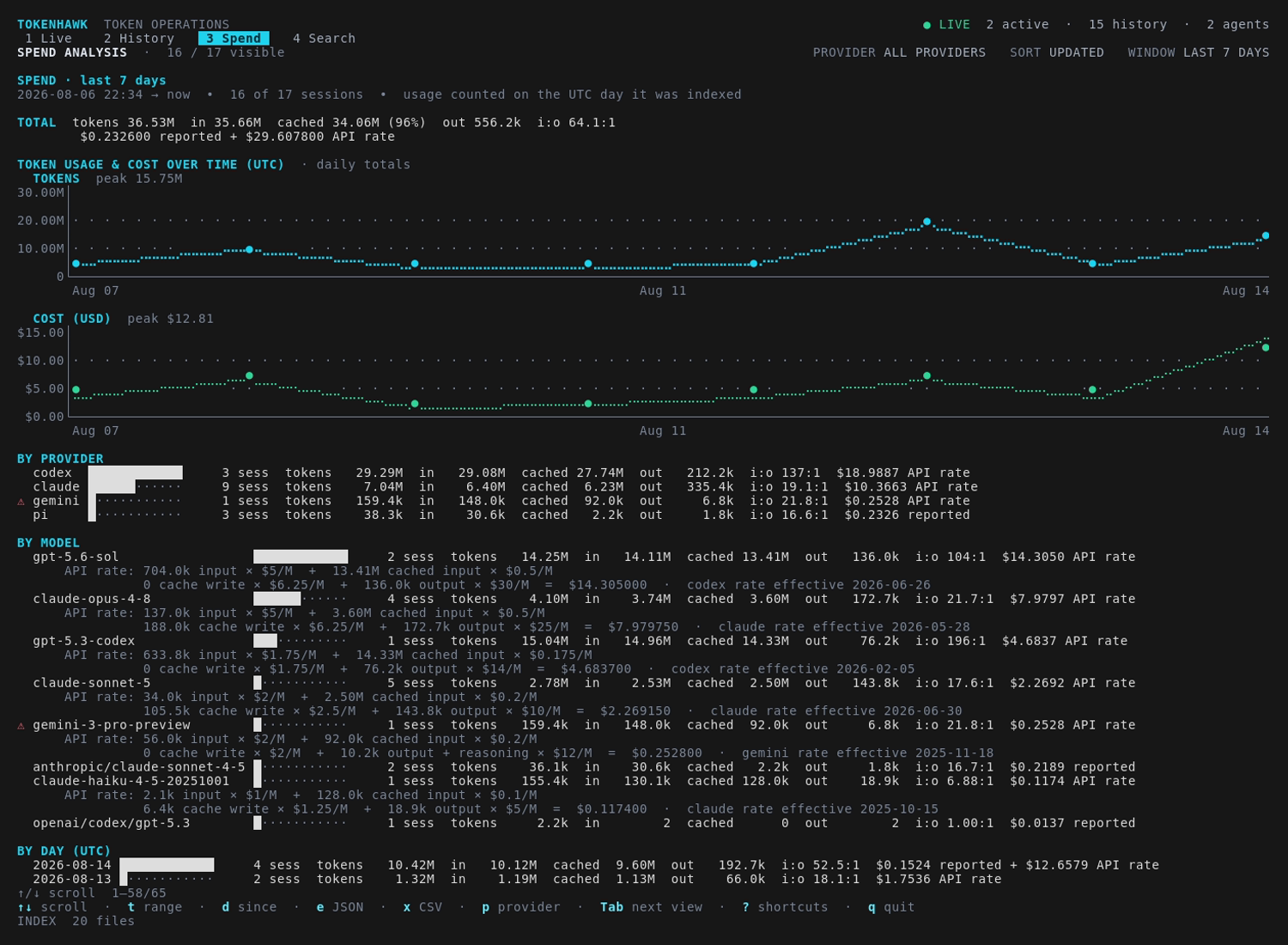
If a reporting window crosses a price change, Tokenhawk shows a separate calculation for each effective rate period. Claude five-minute and one-hour cache writes are priced separately, and Gemini reasoning tokens are included in its billed output quantity.
Press t to cycle through the last 24 hours, last 7 days, last 30 days, month to date, and all time. Press d to enter a custom window, or launch Tokenhawk directly into one:
$ tokenhawk --since 30d
$ tokenhawk --since 2026-07-01
Accepted time windows
Windows accept RFC 3339 timestamps, YYYY-MM-DD dates, relative offsets such as 90m, 24h, 7d, 2w, 3mo, and 1y, compound Go durations such as 1h30m, and the keywords today, yesterday, wtd, mtd, ytd, and all. Relative windows continue rolling while Tokenhawk is open.
Press e or x here to export the displayed totals and provider, model, and day breakdowns instead of raw session rows. Spend exports also include one token-and-cost time-series point per UTC day, including zero-value days.
Anthropic-reported spend
Organization administrators can set an Anthropic Admin API key to import authoritative Claude billing from the Usage and Cost Admin API:
$ export ANTHROPIC_ADMIN_KEY='sk-ant-admin...'
$ tokenhawk
The first interactive run imports 31 UTC days by default. While Tokenhawk remains open, it refreshes the current and previous UTC day every five minutes. In Spend, a successfully covered UTC day uses imported Anthropic cost and suppresses the overlapping local Claude API-rate cost. Reported and API-rate dollars remain visibly separate when both occur in the window.
The Admin API is available to organization administrators, not individual accounts. Pro and Max subscription use has no authoritative per-model billed spend to import. Priority Tier charges and usage routed through Bedrock, Vertex, Foundry, or Claude Platform on AWS are not reported by this endpoint and remain API-rate costs unless their billing provider is integrated separately.
Transcript search and review
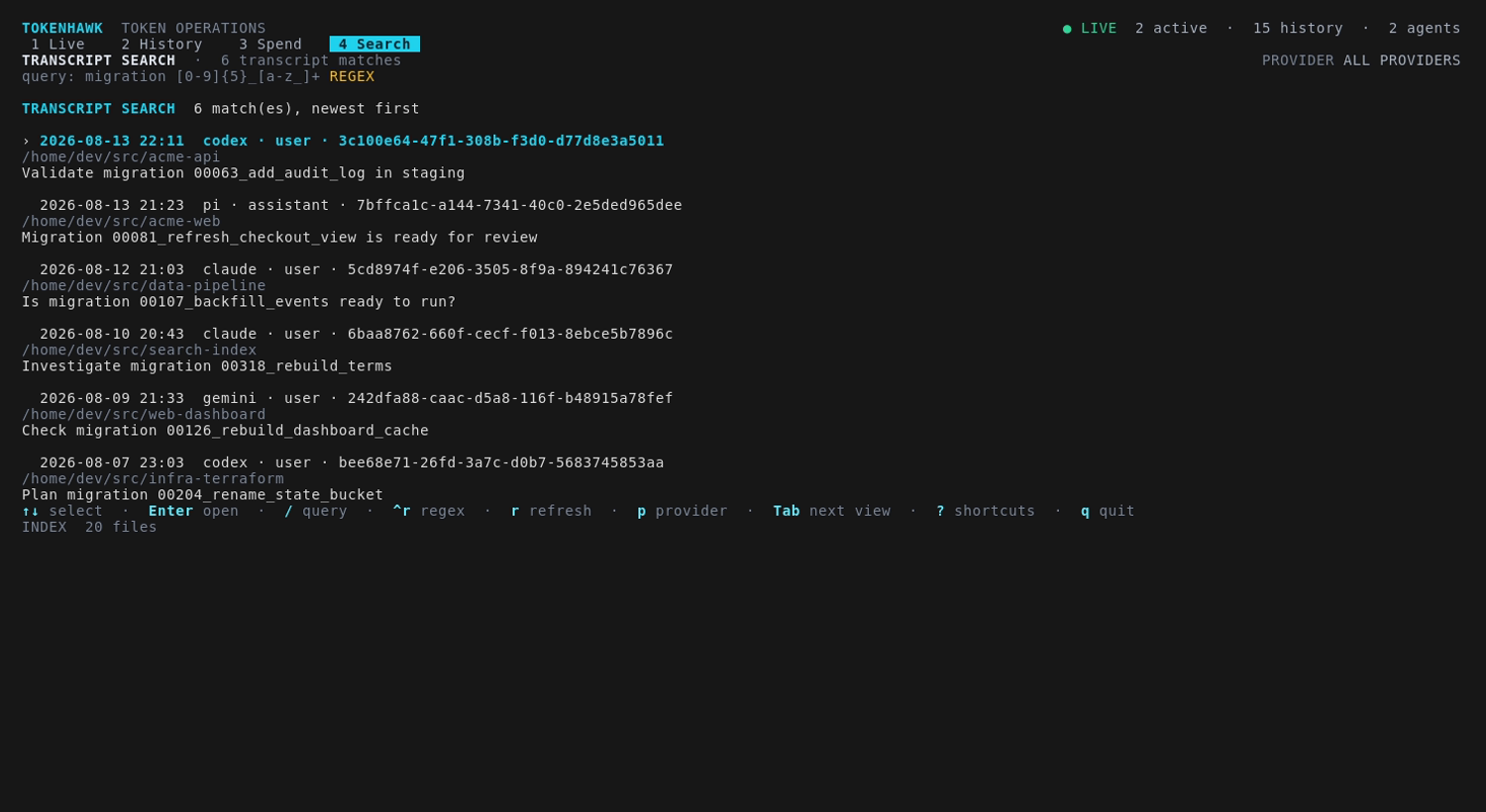
Press 4 to search current and previous user/assistant messages with a case-insensitive literal query. Tokenhawk keeps the newest matching hit from each session, then lists those sessions newest first with the provider, project, time, role, and a short snippet. Select a result and press Enter to open the session complete chronological conversation beneath its usage detail.
Run the same search without opening the TUI:
$ tokenhawk search "database migration"
$ tokenhawk search --provider codex --project "$PWD" --since 30d "SQLite"
$ tokenhawk search --role user --session SESSION_ID --format json "cache invalidation"
$ tokenhawk search --regex 'migration \d+_\w+'
Search flags must precede the query. Use --until, --limit, or --case-sensitive to narrow the matching session set, or --regex to treat the query as a Go regular expression. In the TUI, press Ctrl+R to toggle literal and regular-expression matching.
Claude, Codex (including archived sessions), Gemini, Antigravity CLI, Pi, and OpenCode transcripts are read directly each time. Tool calls, tool results, reasoning blocks, and other non-message payloads are excluded. Tokenhawk decodes only user input and assistant prose from protobuf conversation payloads in AGY SQLite files, leaving reasoning summaries, tool invocations, and other fields opaque.
Inside session detail, use arrows or page keys to scroll, / to find text, n/N to move between matches, and r to reload. A detail export includes the complete loaded conversation with role, timestamp, subagent ID, and text.
Provider data
By default, Tokenhawk discovers usage data in these locations:
| Provider | Default source | Cost |
|---|---|---|
| Claude Code | ~/.claude/projects/**/*.jsonl | API-equivalent estimate |
| Codex | $CODEX_HOME/sessions/**/*.jsonl and archives | API-equivalent estimate |
| Gemini CLI | ~/.gemini/tmp/*/chats/session-*.json | API-equivalent estimate |
Antigravity CLI (agy) | ~/.gemini/antigravity-cli/conversations/*.db | Underlying model estimate |
| Pi | ${PI_CODING_AGENT_SESSION_DIR:-~/.pi/agent/sessions}/**/*.jsonl | Provider-reported |
| OpenCode | ${XDG_DATA_HOME:-~/.local/share}/opencode/opencode.db | Reported or underlying API rate |
Use the corresponding directory flags or the configuration file to point Tokenhawk at nonstandard roots. Run with --rebuild after changing source locations.
Live status inside agent sessions
The compact renderer always selects one session; it never combines usage from multiple sessions. Claude and AGY native hooks supply exact session identifiers. Wrappers select the active, most recently updated session for the current project directory.
Claude Code status line
Add this to ~/.claude/settings.json, merging it with any existing settings:
{
  "statusLine": {
    "type": "command",
    "command": "tokenhawk statusline claude",
    "refreshInterval": 2,
    "padding": 0
  }
}
The command consumes Claude status JSON from standard input and does not add anything to model context.
Antigravity CLI status line
Add this to ~/.gemini/antigravity-cli/settings.json, merging it with any existing settings:
{
  "statusLine": {
    "type": "command",
    "command": "tokenhawk statusline agy",
    "enabled": true,
    "stack_with_default": true
  }
}
AGY supplies the conversation ID, workspace, active model, and cumulative input and output. Tokenhawk stores that usage snapshot and renders it inside AGY. Because AGY exposes cumulative input and output but only current cache counters, cached input is recorded as the best available lower bound. Existing conversations are discovered, but show no token totals until resumed after the status line is configured.
Universal wrapper
The universal wrapper prefers tmux when it is available. Outside tmux it creates a temporary dedicated session; inside tmux it temporarily replaces the right-side status and restores the previous settings when the client exits.
$ tokenhawk wrap codex --cd /path/to/project
$ tokenhawk wrap gemini --model gemini-2.5-pro
$ tokenhawk wrap agy --conversation SESSION_ID
$ tokenhawk wrap pi --model anthropic/claude-sonnet-4-5
$ tokenhawk wrap opencode /path/to/project
$ tokenhawk wrap --no-tmux codex
Without tmux, or with --no-tmux, Tokenhawk runs the client in a built-in pseudo-terminal that reserves the bottom row for the same live status line on macOS and Linux. This mode requires an interactive terminal at least four rows tall. Windows continues to require tmux. Place --no-tmux before the provider name; all arguments after the provider are forwarded unchanged to the selected client.
codex --cd /path does not change Tokenhawk selector.You can also use tokenhawk wrap claude if you prefer the universal wrapper.
Direct renderer
$ tokenhawk status --provider codex --project "$PWD"
$ tokenhawk status --provider claude --session SESSION_ID --format json
$ tokenhawk status --provider gemini --project "$PWD" --format ansi
The renderer incrementally scans provider stores by default. Add --no-scan when another Tokenhawk process already maintains the index. Set NO_COLOR=1 to turn ANSI output into plain text.
Headless export
Export all matching sessions without opening the TUI:
$ tokenhawk export --format json --output usage.json
$ tokenhawk export --format csv --output usage.csv \
    --provider codex --since 2026-07-01
$ tokenhawk export --format csv --output month.csv --since mtd
Filters include --provider, --model, --project, --status, --since, and --until. Both time bounds accept the forms listed under spend reporting. A bare YYYY-MM-DD used with --until includes that entire day.
- JSON contains nested per-model and subagent usage.
- CSV contains tagged session/model and subagent/model rows, including total and one-hour cache-write counts, cost, and running status.
- Local source paths stay excluded unless
--include-sourceis set.
Configuration
Tokenhawk loads tokenhawk/config.toml beneath your operating system user-config directory. Every field is optional and command-line flags take precedence.
claude_dir = "~/.claude/projects"
codex_dir = "~/.codex"
gemini_dir = "~/.gemini/tmp"
agy_dir = "~/.gemini/antigravity-cli"
pi_dir = "~/.pi/agent/sessions"
opencode_db = "~/.local/share/opencode/opencode.db"
active_window = "5m"
refresh = "2s"
db_path = "~/.cache/tokenhawk/index.db"
pricing_file = "~/.config/tokenhawk/pricing.json"
anthropic_cost_lookback_days = 31
include_source = falsetokenhawk --rebuild. Pricing catalog and override changes are fingerprinted and automatically trigger a one-time rebuild.Pricing
Claude, Codex, Gemini, and recognized models used through AGY are priced at public API list rates. These API-rate costs are not subscription charges, invoices, free-tier consumption, discounts, credits, or taxes. AGY labels are normalized before exact lookup and use the underlying Gemini or Claude catalog rate. Pi and nonzero costs recorded by OpenCode are labeled reported and preserved. When OpenCode records zero cost for a recognized OpenAI, Anthropic, or Google model, Tokenhawk applies the underlying model public API list rate.
The bundled, effective-dated catalog prices only exact, known model IDs. The spend view identifies the rate and effective date behind each API-priced model cost, while unknown models remain unpriced instead of inheriting a guessed family rate. Anthropic Admin API billing, when configured, is also labeled reported.
Override a rate
{
  "version": "company-rates-1",
  "rates": [{
    "provider": "codex",
    "model": "my-exact-model-id",
    "effective_from": "2026-01-01",
    "input_per_million": 1.0,
    "cached_input_per_million": 0.1,
    "cache_creation_per_million": 1.0,
    "cache_creation_1h_per_million": 2.0,
    "output_per_million": 8.0
  }]
}Commands & flags
| Command | Purpose |
|---|---|
tokenhawk | Open the interactive terminal dashboard |
tokenhawk status | Render one selected session as plain, ANSI, tmux, or JSON |
tokenhawk statusline claude|agy | Consume a native provider status payload and render one session |
tokenhawk wrap [--no-tmux] <provider> | Run a supported client with a live status bar |
tokenhawk search | Search user and assistant transcript text on demand |
tokenhawk export | Write matching sessions as JSON or CSV |
tokenhawk upgrade | Check for, verify, and install the latest release |
tokenhawk version | Print the installed version |
Shared selection and storage flags
--providerFilter to claude, codex, gemini, agy, pi, or opencode.--modelFilter by model metadata.--projectFilter or select by project path.--statusFilter active or inactive sessions.--sinceOpen the TUI on a spend window, or set an export or search lower time bound.--untilSet an export or search upper time bound.--sessionSelect an exact session ID for status output or transcript search.--roleSearch only user or assistant messages.--limitSet the maximum number of matching sessions returned by transcript search.--case-sensitiveMake transcript search case-sensitive.--regexTreat a transcript search query as a Go regular expression.--configLoad a specific configuration file.--dbUse a specific index database.--agy-dirUse a specific Antigravity CLI data directory.--pricing-fileLoad a specific pricing override JSON file.--anthropic-cost-lookback-daysSet the UTC-day history imported on the first Anthropic billing sync.--rebuildReset and rebuild the local index.--refreshSet the local provider scan and session reconciliation interval.--active-windowSet how recently a session must update to be active.Troubleshooting
Tokenhawk is installed but the command is missing.
Make sure ~/.local/bin (or your custom TOKENHAWK_INSTALL_DIR) is on your shell PATH, then open a new terminal.
A provider does not appear.
Confirm the provider has created at least one local session and that its source path matches the defaults above. For a custom location, set the corresponding config field or CLI flag and run tokenhawk --rebuild.
The wrapper cannot start.
Confirm the selected provider client is installed and available on your PATH. Tokenhawk prefers tmux when available and otherwise uses its built-in pseudo-terminal wrapper on macOS and Linux; pass --no-tmux before the provider name to select that mode explicitly. The built-in wrapper requires an interactive terminal at least four rows tall. Windows requires tmux.
A cost is marked unpriced.
The model identifier does not exactly match a bundled price. Add an exact identifier through a pricing override file instead of relying on a guessed family rate.
Anthropic billing does not appear.
Billing sync requires an organization Admin API key in ANTHROPIC_ADMIN_KEY. It is unavailable to individual Pro and Max accounts. Check the TUI footer for an API warning, and clear any active Spend search or non-Claude provider filter.
How do I disable ANSI color?
Set NO_COLOR=1. ANSI status-line output will render as plain text.